
 1 / 8
1 / 8 Click image to magnify
Logitech Brio 4K Ultra HD Webcam
Cash on Delivery adds 4% to your order total at checkout. Choose bank deposit to avoid the COD charge.
Get notified when this is back in stock
Enter your email and the TechAndExperts team will contact you when this exact variant is available again.
Shown at checkout
Compatibility help available
7-day policy
WhatsApp help
Specifications
These notes summarize information in this listing and model-specific compatibility checks. They are not a hands-on or laboratory test.
Product details
Specifications, compatibility and what to check before ordering.
Logitech Brio 4K Ultra HD Webcam
Key Features
Step into a new era of video communication with the Logitech BRIO Webcam, designed to be the new benchmark for webcams. Offering unmatched quality and performance, this technologically advanced webcam is perfect for video conferencing, streaming, or recording. The Logitech BRIO boasts professional-grade features, including 4K Ultra HD resolution at 30 fps, 5x digital zoom, high frame rates, exceptional low-light performance, HDR, and Right Light 3 technology.
A New Benchmark for Webcams
Step up to the world’s most technologically advanced webcam and get professional-quality video for video conferencing, streaming, or recording. Logitech BRIO webcam is packed with features that produce stunning video in any environment. Our premier 4K ultra high-def camera offers 5x digital zoom, high frame rates, outstanding low-light performance, HDR, and Right Light 3.

Capture Every Detail in 4K HD
Stream crystal-clear video with superb resolution, frame rate, color, and detail. Logitech BRIO delivers 4K Ultra HD at 30 fps or 1080p at either 30 or an ultra-smooth 60 fps for outstanding clarity, smoothness, and detail. Get a closer look with 5x zoom.


Look Great in Any Light
Now you can use your video conferencing, streaming, and video recording applications in any lighting condition with Logitech BRIO webcam – and always look your best. Whether in low light or bright sunshine, Logitech BRIO with Right Light 3 and high dynamic range (HDR) technology adjusts to highlight the most important subject: you.
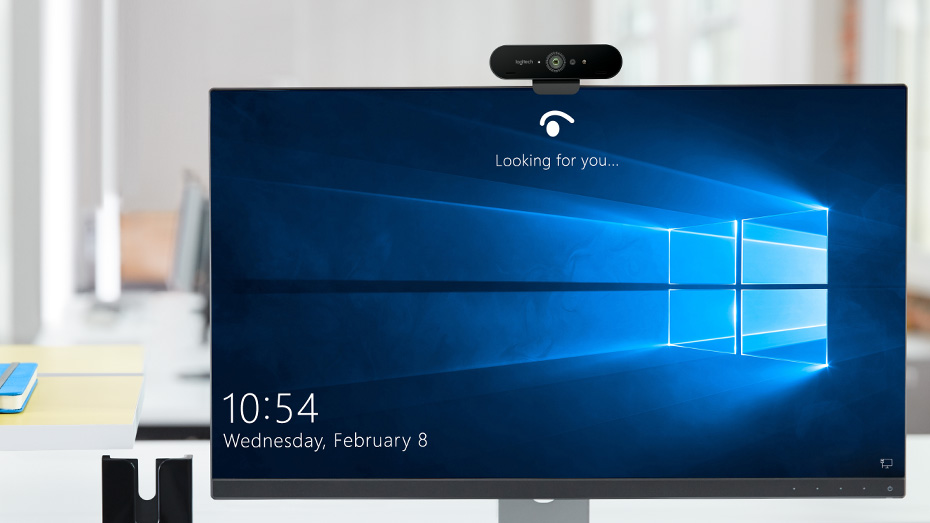
Security Meets Convenience
Powered by both optical and infrared sensors, BRIO delivers fast and secure facial recognition for Windows Hello. No need to type a password for Windows 10: simply look into BRIO’s lens to login.
Additional Features
Adjustable Field of View
Logitech BRIO webcam enables you to choose from three field of view settings to perfectly frame your video. For an ideal head and shoulders shot, pick 65 degrees. For larger groups or to capture more of the room, choose 78 or 90 degrees.
4K Recording
Use Logitech BRIO webcam with software like Camera for Windows 10, X Split Broadcaster, OBS, and Swift Capture to record in resolutions up to 4K.
Smooth Streaming
Logitech BRIO retains a high frame rate whatever the lighting to match your gaming broadcast with no lag. Stream in full 1080p HD at up to 60 frames per second for smooth, fluid video that keeps up with your every move.
Certified for Business
Logitech BRIO webcam is certified compatible with Skype for Business, Windows Hello, and Cisco Jabber™, works with Microsoft Cortana®, and offers enhanced integration with BlueJeans, Broadsoft, LifeSize Cloud, Vidyo, and Zoom. If your preferred application can recognize a webcam, you can use it with Logitech BRIO webcam.
Mounting & Privacy Options
Mount the camera wherever it works best – LCD screen, notebook, or tabletop – with the adjustable clip, or mount BRIO on your own tripod instead. A removable shade flips down to assure privacy and peace of mind.
5x HD Zoom
Zoom in and pan around to crop out distracting backgrounds, perfectly frame you and a friend, or capture the entire scene. Logitech BRIO’s next-generation 4K image sensor delivers HD quality without jaggies or blur, even when zoomed in.
Camera Settings
Customize your Logitech BRIO webcam and access pan, zoom, and image controls with Logitech Camera Settings software for Windows and Mac.
Specifications
System Requirements
- Windows® 7, 10 or higher (Windows 8.1 or higher required for resolutions greater than 1080p)
- MacOS® 10.10 or higher
- Chrome OS™ Version 29.0.1547.70 and higher
- 2 GB RAM or more
- Hard drive space for recorded videos
- One USB 2 or USB 3 port (4K recording and streaming requires a USB 3.0 port and compatible software)
Compatibility
- Certified compatibility for Skype for Business, Microsoft Cortana, Windows Hello, and Cisco Jabber. Compatible with Microsoft Teams.
Background Replacement
- Windows: Works with Chroma Cam by Personify
- Mac: Beta driver available
4K Streaming and Recording
- Windows: Works with Camera for Windows 10, X Split, OBS
- Mac: Works with Swift Capture
Technical Specifications
- 4K Ultra HD video calling (up to 4096 x 2160 pixels @ 30 fps)
- 1080p Full HD video calling (up to 1920 x 1080 pixels @ 30 or 60 fps)
- 720p HD video calling (up to 1280 x 720 pixels @ 30, 60, or 90 fps)
- Plug-and-play USB connectivity
- 90-degree field of view (FOV) with two additional settings (65 and 78 degrees) available with optional software download
- 5x digital zoom in Full HD
- Autofocus
- Right Light 3 with HDR for clear image in various lighting environments ranging from low light to direct sunlight
- Image controls with optional Camera Settings application for control of pan, tilt, and zoom
- Built-in dual omni-directional mics with noise cancellation
- Infrared sensor technology for Windows Hello (SDK available for application integration)
- External privacy shutter
- Multiple mounting options, including clip and tripod mount
- Supports multiple connection types, including USB 2.0 Type A and USB 3.0 Type A and C connections
- Custom carrying case
What's in the box?
- Logitech BRIO 4K Ultra HD Webcam
- USB 3.0 cable (compatible with USB 2.0)
- Removable clip
- Privacy shade
- Carrying pouch
- Documentation
No verified buyer reviews yet
Be the first to share your experience with this product, or ask our team to confirm fit and compatibility before ordering.
You May Also Like
Compare in-stock models in the same product category before checkout.
Logitech Brio 4K Ultra HD Webcam FAQs
Quick answers for the checks customers usually make before ordering tech accessories online in Pakistan.
What product details should I verify before ordering Logitech Brio 4K Ultra HD Webcam?
Review the product title, model number, photos, specifications, seller-provided brand information, and any warranty terms shown on this page. Contact TechAndExperts before ordering if you need confirmation about the supplied variant or documentation.
How do I know this product is compatible with my device?
Check the product title, variant, connector, size, model notes, and product images before checkout. If you are unsure, message TechAndExperts before ordering so the team can confirm the right fit.
What should I compare before buying?
Compare the listed features with your daily use case, because the right choice depends on compatibility, current availability, listed support terms, delivery time, and how you plan to use the product.
What should I check in the product photos?
Review all product images, selected variant names, and written specifications before checkout. For tech accessories, small differences in connector, model, wattage, or case cutout can change compatibility.
Can I order this with cash on delivery in Pakistan?
Cash on Delivery is available for eligible orders in Pakistan with a 4% COD charge added at checkout. Delivery timing depends on your city, courier route, and stock availability at the time of order confirmation.
What if I receive the wrong item or a faulty product?
Contact TechAndExperts support quickly with your order details, product photos, and packaging photos. The team can guide you through warranty, exchange, or return steps according to the store policy.
Can TechAndExperts help me choose before I order?
Yes. If you are choosing between similar products, message TechAndExperts on WhatsApp before ordering. The support team can help compare compatibility, use case, and stock availability.
Should I buy only by the lowest price?
Avoid choosing only by the lowest price. For accessories, device compatibility, safety details, listed support terms, cable quality, and after-sale help usually matter more than a small price difference.

Logitech Brio 4K Ultra HD Webcam
Logitech Brio 4K Ultra HD Webcam
Key Features
Step into a new era of video communication with the Logitech BRIO Webcam, designed to be the new benchmark for webcams. Offering unmatched quality and performance, this technologically advanced webcam is perfect for video conferencing, streaming, or recording. The Logitech BRIO boasts professional-grade features, including 4K Ultra HD resolution at 30 fps, 5x digital zoom, high frame rates, exceptional low-light performance, HDR, and Right Light 3 technology.
A New Benchmark for Webcams
Step up to the world’s most technologically advanced webcam and get professional-quality video for video conferencing, streaming, or recording. Logitech BRIO webcam is packed with features that produce stunning video in any environment. Our premier 4K ultra high-def camera offers 5x digital zoom, high frame rates, outstanding low-light performance, HDR, and Right Light 3.
Capture Every Detail in 4K HD
Stream crystal-clear video with superb resolution, frame rate, color, and detail. Logitech BRIO delivers 4K Ultra HD at 30 fps or 1080p at either 30 or an ultra-smooth 60 fps for outstanding clarity, smoothness, and detail. Get a closer look with 5x zoom.
Look Great in Any Light
Now you can use your video conferencing, streaming, and video recording applications in any lighting condition with Logitech BRIO webcam – and always look your best. Whether in low light or bright sunshine, Logitech BRIO with Right Light 3 and high dynamic range (HDR) technology adjusts to highlight the most important subject: you.
Security Meets Convenience
Powered by both optical and infrared sensors, BRIO delivers fast and secure facial recognition for Windows Hello. No need to type a password for Windows 10: simply look into BRIO’s lens to login.
Additional Features
Adjustable Field of View
Logitech BRIO webcam enables you to choose from three field of view settings to perfectly frame your video. For an ideal head and shoulders shot, pick 65 degrees. For larger groups or to capture more of the room, choose 78 or 90 degrees.
4K Recording
Use Logitech BRIO webcam with software like Camera for Windows 10, X Split Broadcaster, OBS, and Swift Capture to record in resolutions up to 4K.
Smooth Streaming
Logitech BRIO retains a high frame rate whatever the lighting to match your gaming broadcast with no lag. Stream in full 1080p HD at up to 60 frames per second for smooth, fluid video that keeps up with your every move.
Certified for Business
Logitech BRIO webcam is certified compatible with Skype for Business, Windows Hello, and Cisco Jabber™, works with Microsoft Cortana®, and offers enhanced integration with BlueJeans, Broadsoft, LifeSize Cloud, Vidyo, and Zoom. If your preferred application can recognize a webcam, you can use it with Logitech BRIO webcam.
Mounting & Privacy Options
Mount the camera wherever it works best – LCD screen, notebook, or tabletop – with the adjustable clip, or mount BRIO on your own tripod instead. A removable shade flips down to assure privacy and peace of mind.
5x HD Zoom
Zoom in and pan around to crop out distracting backgrounds, perfectly frame you and a friend, or capture the entire scene. Logitech BRIO’s next-generation 4K image sensor delivers HD quality without jaggies or blur, even when zoomed in.
Camera Settings
Customize your Logitech BRIO webcam and access pan, zoom, and image controls with Logitech Camera Settings software for Windows and Mac.
Specifications
System Requirements
- Windows® 7, 10 or higher (Windows 8.1 or higher required for resolutions greater than 1080p)
- MacOS® 10.10 or higher
- Chrome OS™ Version 29.0.1547.70 and higher
- 2 GB RAM or more
- Hard drive space for recorded videos
- One USB 2 or USB 3 port (4K recording and streaming requires a USB 3.0 port and compatible software)
Compatibility
- Certified compatibility for Skype for Business, Microsoft Cortana, Windows Hello, and Cisco Jabber. Compatible with Microsoft Teams.
Background Replacement
- Windows: Works with Chroma Cam by Personify
- Mac: Beta driver available
4K Streaming and Recording
- Windows: Works with Camera for Windows 10, X Split, OBS
- Mac: Works with Swift Capture
Technical Specifications
- 4K Ultra HD video calling (up to 4096 x 2160 pixels @ 30 fps)
- 1080p Full HD video calling (up to 1920 x 1080 pixels @ 30 or 60 fps)
- 720p HD video calling (up to 1280 x 720 pixels @ 30, 60, or 90 fps)
- Plug-and-play USB connectivity
- 90-degree field of view (FOV) with two additional settings (65 and 78 degrees) available with optional software download
- 5x digital zoom in Full HD
- Autofocus
- Right Light 3 with HDR for clear image in various lighting environments ranging from low light to direct sunlight
- Image controls with optional Camera Settings application for control of pan, tilt, and zoom
- Built-in dual omni-directional mics with noise cancellation
- Infrared sensor technology for Windows Hello (SDK available for application integration)
- External privacy shutter
- Multiple mounting options, including clip and tripod mount
- Supports multiple connection types, including USB 2.0 Type A and USB 3.0 Type A and C connections
- Custom carrying case
What's in the box?
- Logitech BRIO 4K Ultra HD Webcam
- USB 3.0 cable (compatible with USB 2.0)
- Removable clip
- Privacy shade
- Carrying pouch
- Documentation